
Business check printing software that runs in your browser
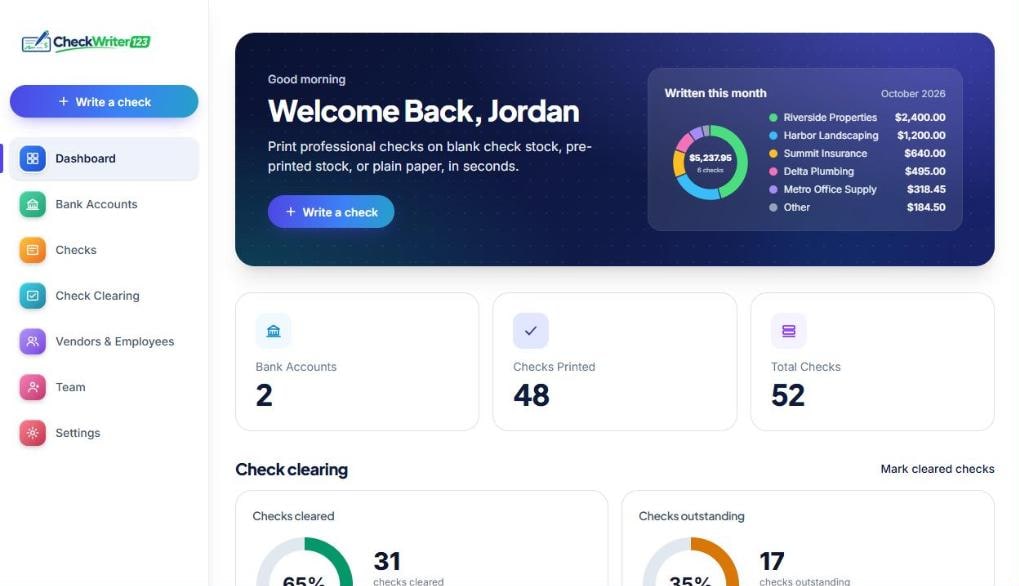
Check Writer 123 is online business check printing software. You enter the payee and amount in your browser, and it prints a complete business check on your own printer, with the amount in words, your logo and signature on Mid Tier and Unlimited, and the bank number line. Every check goes into a searchable register. Plans start at $5.99 a month, and the 14-day trial needs no card.
14-day free trial, no card needed. Works on Windows, Mac and Chromebook. Nothing to install.
What goes wrong when a business writes checks the old way
Every change means a new box of checks
A new address, a new signer or a new logo means reordering printed checks and waiting days for them to arrive. When you print your own, the next check carries the new details the moment you save them.
Handwritten checks are slow and easy to get wrong
Writing the vendor name, the amount in numbers and then again in words is where mistakes happen, and a spoiled check has to be voided and rewritten. Typed entry with the words filled in for you removes most of that work.
Nobody can find what was paid
Check stubs get lost, and the one you need is always the one that is missing. A register with the payee, amount, date, memo and status of every check replaces the drawer of stubs.
Accounting software is more than you want
Some accounting packages print checks, but you may not want to run your books inside one just to issue a handful of checks a month. A standalone tool works next to whatever books you already keep.
How a business prints checks with Check Writer 123
Setup takes about ten minutes once. After that a check takes under a minute. The paper side is covered step by step in how to print business checks.
- 1
Add the business bank account
Enter the business name and address as they appear on the account, the routing number and the account number. The routing number is checked for typos as you type. On Mid Tier and Unlimited, add a logo and a signature. On the other plans, leave the signature line empty and sign by hand.
- 2
Choose how you print
You can print complete checks on blank check stock, print only the variable fields on your bank's pre-printed checks, or print a decorated check on plain paper for deposits you make yourself. Most businesses use 3-to-a-page blank stock. See what blank check stock is.
- 3
Save your vendors and employees
Add the people and companies you pay regularly once. After that you pick a name from a list, which also keeps spelling consistent from one check to the next.
- 4
Write one check or a batch
Enter the payee, amount, date and memo, and a live preview shows the finished check. For a monthly bill run, enter up to 25 checks in one table and print them together. Invoice numbers can go on the stub.
- 5
Test it, print it, keep the record
Print a free Test Print on plain paper to confirm alignment, then print the real check. It is saved to the register with its number, and you can export the register as a spreadsheet for your bookkeeper.
Features a business actually uses
Multiple bank accounts
Keep operating, payroll or a second company separate, each with its own name, address, logo, signature and alignment. Occasional includes 1 account, Mid Tier 4, and Unlimited has no limit.
Saved vendors and employees
Enter a payee once and reuse it, so a recurring supplier check takes seconds.
Batch entry and printing
Enter up to 25 checks in one table and print up to 50 selected checks together. See how to print multiple checks at once.
Invoice lines on the stub
Paste invoice numbers, dates and amounts and they print on the stub, so a supplier can match your payment to their invoices.
A searchable check register
Every printed check is saved with its payee, amount, date and history. Search it, print a register report or download it as a CSV file.
Test Print, reprints and voided checks
Test alignment on plain paper for free, reprint a saved check at no cost if the printer jams, and print a voided check when your bank asks for one.
A business runs its monthly payments
A plumbing company with one operating account sits down on the first of the month with five payments: shop rent of $2,100.00, a parts supplier at $1,284.55, a truck insurance premium of $396.00, a subcontractor invoice of $850.00 and a utility bill of $142.30.
The vendors are already saved, so each check takes a few keystrokes. The supplier check lists its two invoice numbers on the stub. A Test Print confirms alignment, then all five print together, and the register shows five checks totalling $4,772.85, ready to export for the bookkeeper.
An illustration with made-up figures, not a real customer.
What equipment and check paper do you need?
You need a regular inkjet or laser printer, a computer with a browser, and check paper. The most complete option is blank check stock, where the whole check including the bank number line is printed by the software. Some businesses prefer pre-printed checks from their bank, where only the changing details are printed. Plain paper also works for checks you deposit yourself.
Your own paper and ink are an extra cost on top of the software. Read what kind of paper you need and what printer is best for printing checks before you buy.
Keeping business checks safe
Blank check stock is a fraud risk if it is left out, so lock it away and shred spoiled checks. Inside the software, the register and each check's history show what was printed and when. If you want two people involved, have one person prepare the checks and a second review the list and sign each one by hand.
For a routine that small teams can follow, see check fraud prevention for small business and what positive pay is. Card numbers for your subscription go straight to Square and never touch our servers.
How it compares with other ways to get business checks
Ordering from your bank or a check printer gives you finished checks but locks in the layout and takes time to reorder. Accounting packages can print checks but tie you to their books. Print-and-mail services send payments for you. Software like this sits in the middle: you print when you need to, on your own paper, and keep your books wherever you like.
For a closer look, read best check printing software, check printing software vs ordering checks from a bank and our comparison of ten options.
What it costs
One flat monthly price. Every paid plan has all check templates, batch printing and the check register. Logo, signature and cloud backup come with Mid Tier and Unlimited. You also pay for your own paper and ink.
Occasional Pack
$5.99
per month
20 checks a month
1 bank account
Mid Tier
$10.99
per month
60 checks a month
4 bank accounts
Unlimited
$25.99
per month
Unlimited checks
Unlimited bank accounts
A check counts when you press Print. Reprints and Test Prints are free. 30-day money-back guarantee on your first payment; see the refund policy.
Frequently asked questions
What is business check printing software?
It is software that fills in a business check on screen and prints it on your own printer, instead of handwriting it or ordering pre-printed checks. It lays out the payee, the amount in numbers and words, the date, the memo, your logo and signature, and the bank numbers along the bottom. You supply the bank account and the check paper.
Do I need special paper to print business checks?
For the most complete result, use 3-to-a-page blank check stock, which Check Writer 123 prints in full including the number line. You can also use pre-printed checks from your bank, where only the variable details are printed, or plain paper for checks you deposit yourself.
Will my bank accept checks I print myself?
Many banks do when the check is clear and correct, but practice varies. The safest approach is to ask your bank and deposit one test check before you print a lot. Our guide to whether banks accept checks you print yourself has a practical checklist.
How much does it cost?
Plans are $5.99 a month for 20 checks and 1 bank account, $10.99 for 60 checks and 4 accounts, and $25.99 for unlimited checks and accounts. There is also a free plan with 5 checks a month. Every paid plan has all check templates, batch printing and the register. You pay separately for paper and ink. See the pricing page.
Can I use it for more than one business?
Yes, as long as each business has its own bank account in the app. Each account keeps its own name, address, logo, signature and alignment settings, within the account limit of your plan.
Does it work with QuickBooks or other accounting software?
There is no direct connection. Many businesses print here and record each payment in QuickBooks, a spreadsheet or another system with the same check number. The register can be downloaded as a CSV file to help with that. See QuickBooks check printing software.
Is there a free trial?
Yes. Every new account gets a 14-day free trial of a paid plan with no card needed, and you can print real checks during it. If you do not add a card, nothing is charged and access simply ends when the trial does. The first payment has a 30-day money-back guarantee.
Can I pay once instead of monthly?
Yes. The Digital Checkbook is a one-time purchase of 100, 200 or 500 printed checks for $15, $25 or $35. The checks never expire and nothing renews. It is meant for businesses that write checks only now and then. See the Digital Checkbook.
Guides for businesses that pay by check
- How to Print Business Checks
- How to Print Checks for Your Business
- Check Printing for Small Businesses
- How to Print Vendor Checks
- How to Print Checks for Multiple Bank Accounts
- How to Keep a Digital Record of Printed Checks
- Check Fraud Prevention for Small Business
- Best Check Printing Software
Also for
- Anyone who prints their own checks
- Small businesses
- Mac users
- Windows users
- Chromebook users
- Landlords and property managers
- Contractors and trades
- Churches and nonprofits
- Bookkeepers and accountants
- Daycares and small shops
- Law firms and small practices
- Auto repair shops and dealerships
- People who want to try check printing software first
- People who want free check printing software
- People deciding whether to pay for ACH payment software
- People deciding whether to pay for wire transfer software
- People deciding whether to pay for check mailing services
- People deciding whether check writing software is worth it
- People who handwrite checks and want something easier
- People deciding between printing checks and ordering them
- People comparing check writing software with what their bank offers
- People who want to save time writing checks
- Small businesses that need better check records
- People who want to avoid check writing mistakes and wasted checks
- People who print checks now and then
- People searching to buy checks online
- People who do not want a subscription
- People wondering what a digital checkbook is
- People comparing a digital checkbook with regular checks
- People who want to know how a digital checkbook works
- People weighing the benefits of a digital checkbook
- People checking the price of a digital checkbook
- Employers who pay staff by check
- People who print on blank check stock
- People who print the MICR line on checks
- LLC owners
- Anyone: print checks online
Print your business checks in minutes
Start the 14-day free trial. No card needed, nothing to install.